
A product demonstration can look polished and still leave a muted viewer with a basic question: what is being offered? If the answer only appears in the voiceover, the visuals may attract attention without communicating a useful message.
To make a video ad understandable without sound, decide what the audience needs to understand, show the essential action, and use readable text and captions to carry information that would otherwise be lost. Then watch the finished version in its intended placement and ask someone unfamiliar with the brief what they understood.
Sound can still add personality and detail. The practical goal is to make the important message available when audio is unavailable, while keeping the spoken and visual versions consistent.
Start with the message the viewer needs
Before editing, write down four things: who the offer is for, the main idea, any condition needed to understand it fairly, and the next action. Rank them. A short ad may not have room to explain every feature, but it should not hide a condition that changes the meaning of the offer.
For a hypothetical Indonesian office-furniture seller, the objective might be to generate suitable quotation requests for meeting-room tables. The main message could be that a buyer can check the table’s dimensions before requesting a quote. The action is to visit the product page and request a quotation; delivery coverage should be stated or made clear at the appropriate point in the journey.
That decision gives the editor a basis for choosing footage and text. A dramatic shot of a meeting room may establish context, but it does not show which table is being offered or how someone can check its size. For the broader production assignment, a clear ad creative brief can record the audience, evidence, offer and format requirements before editing begins.
Build a visual sequence that carries the idea
Sketch the story as a series of visible actions before adding copy. Each shot should give the next one context. For the furniture example, a practical sequence could be:
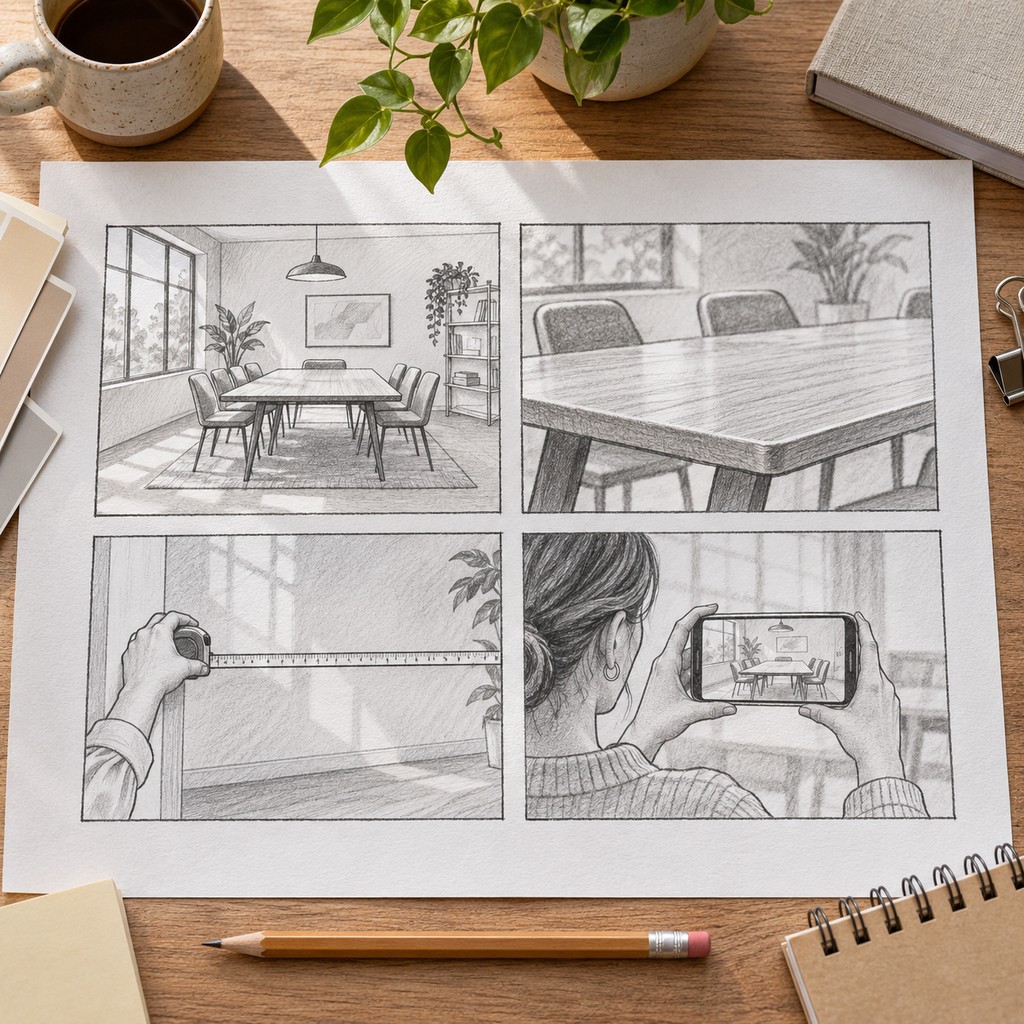
- Show the table in a small meeting room so the use case is recognizable.
- Show a close view of the table alongside a simple dimension graphic based on verified specifications.
- Show a person comparing those dimensions with a room plan or measuring a space.
- End with the product and a clear invitation to request a quotation.
This is a hypothetical treatment, not a tested result. It illustrates a useful distinction: the room image establishes the situation, while the measurement action explains why the dimensions matter. If the business does not offer room planning, the sequence should not imply that it does.
Watch for gaps that audio was covering. A hand pointing at a product may be ambiguous unless the relevant feature is visible. A before-and-after sequence needs a clear relationship between the two states; otherwise, a viewer may see two unrelated scenes. If a claim depends on conditions or evidence, make those available instead of relying on a suggestive visual alone.
Give the viewer enough time to recognize each change. When a shot must introduce a new object and carry a sentence at the same time, consider simplifying the scene, shortening the wording or extending the shot. There is no universal duration that makes every message readable.
Use captions and on-screen copy for different jobs
Captions convey the audio information needed to understand a video. They can include speech, speaker identification when needed, and meaningful non-speech sounds. The W3C’s caption guidance explains the distinction and the need to synchronize captions with the media.
On-screen copy can do a different job: identify the product, highlight a benefit, explain a visual or state the next action. A phrase such as “Check the dimensions” can guide the viewer through a demonstration, but it is not a complete caption for a longer spoken explanation. Conversely, a full caption track does not automatically create a clear visual hierarchy for the offer.
Write the spoken script and on-screen copy together. Remove duplication when it makes the frame crowded, but preserve essential information. If the voice says “delivery is available only within the listed service area,” a prominent visual promise of “delivery everywhere” would be misleading even if the caption is accurate.
When using automatic captions, edit them against the audio. Check product names, numbers, punctuation, speaker changes and any meaningful sound that affects the story. If the ad uses Bahasa Indonesia, write and review the audience-facing wording in the language the intended audience needs; do not assume an English working brief is suitable ad copy.
Make every essential line readable in context
A sentence that looks clear in an editing window may be difficult to read on a phone or when a placement adds interface elements. Use a legible typeface, sufficient contrast and a background treatment that keeps words visible over the footage. Avoid placing captions over product details the viewer needs to see.
Keep each screen focused. Instead of showing a product name, three features, an offer, conditions and a call to action simultaneously, distribute information across the sequence while preserving the relationships between them. If a condition qualifies a claim, place it where the viewer can connect the two; do not leave it on a fleeting final frame.
Preview the actual export at a realistic size and in the intended placement. Check whether captions, buttons or other interface elements overlap important text. Placement layouts and specifications can change, so consult the relevant platform’s current guidance before finalizing an asset. Reframe or redesign where necessary rather than assuming one layout will work everywhere.
Check comprehension before evaluating campaign results
Watch the exported ad with sound off from beginning to end. Then ask a few people who have not seen the brief to describe, in their own words, what is being offered, who it is for, what conditions they noticed and what they would do next. Avoid explaining the intended answer first. Note where their answers differ from the message you meant to communicate.
Use the observations to locate the problem. If viewers recognize the table but miss the quotation action, the final instruction may need more prominence or time. If they understand the action but assume a design service is included, the visuals or wording may need to clarify the offer. A small informal viewing exercise can reveal confusion; it does not establish campaign performance or represent the entire audience.
A paid comparison answers a separate question. For example, you might compare two ways of presenting the same offer, keeping the destination and other relevant conditions consistent where feasible. Decide the campaign outcome and measurement approach in advance using the framework for planning an ad creative test around one clear objective. Clicks can show a response to the ad, but they do not by themselves prove that people understood it or became qualified inquiries.
Finally, watch with sound on as well. Captions, voice, music and visuals should support the same interpretation. A useful sound-off version stands on its own, while the sound-on version can add detail without changing the promise.
Catatan tentang konteks
Performance advertising dipengaruhi oleh objective, audience, offer, creative, measurement, budget, market, dan faktor bisnis lainnya. Gunakan contoh sebagai alat berpikir, bukan jaminan hasil.
Related guides

How to Turn a Static Ad into a Carousel with a Clear Sequence
Give each carousel card a distinct job while keeping the original ad’s promise, offer conditions and next action clear.
How to Adapt a Landscape Video Ad for a Vertical Screen
A vertical version needs more than a narrower export. Learn how to choose a crop, follow the action, rebuild crowded scenes, and…

How to Adapt One Ad Concept for Multiple Formats
A single ad concept can take different forms without making different promises. Use this practical framework to plan, produce and evaluate format…